
Saturday, 10 October 2015

5 Quick and Easy Ways to Use Social Media to Boost Engagement and Build Your Email List
Here are some highly relevant tips from Kim Garst for building your email list
Email marketing is huge and likely will be for many years to come. In fact, in Salesforce Marketing Cloud’s recently released 2015 State of Marketing Report, 73 percent of 5,000 marketers agreed that email marketing is core to their businesses and 60 percent went so far as to say that it was a “critical enabler” of their products and services, an 18 percent increase over 2014.
Email marketing is huge and likely will be for many years to come. In fact, in Salesforce Marketing Cloud’s recently released 2015 State of Marketing Report, 73 percent of 5,000 marketers agreed that email marketing is core to their businesses and 60 percent went so far as to say that it was a “critical enabler” of their products and services, an 18 percent increase over 2014.
Here are five quick and easy ways that you can use social media to build not just a large, but a highly targeted and engaged email list.
1. Integrate your email service with your Facebook page.
Most major email service providers will have an app that allows you to collect emails right from within your Facebook page. These apps will let you have a fully functional email opt-in form, and your fans will never even have to leave Facebook.
Your fans will simply need to click on the tab underneath your cover photo to access the form. As always, it’s a good idea to offer something of value here rather than just asking your fans to sign up for your list.
2. Hold a contest.
Hold a contest that makes handing over a valid email address an entry requirement. Try to choose a prize that only your target audience would care about, otherwise you could end with a whole lot of subscribers who really don’t care about your business. A strategically designed contest can yield amazing results.
To increase interest in my annual social media live event, Social Boom, I ran a Facebook contest where the winner would receive an “All Access Pass” to the event. Within 48 hours I had more than 800 entries, each one willing to give me their email address in exchange for their entry.
The best part is that these are not just “any” email subscribers. They are interested in social media or they would have not entered a contest to win a free ticket to a social media event.
There are a lot of great, low-cost apps out there that make it quick and easy to build your own Facebook contest.
3. Use Twitter to reach more followers and build your list.
With it getting harder and harder to reach fans on Facebook without using paid advertising, many (including me!) are finding great success distributing free offers using Twitter. For instance, my free ebook, 23 Quick & Easy Ways to Get More Twitter Retweets, has been downloaded over 10,000 times, resulting in thousands of new email list subscribers, as a result of a continuing series of tweets.
Even more exciting, I do not have to actually be on site to post the tweets. There are tons of tweet schedulers out there. I use Hootsuite for my normal tweet scheduling but, for evergreen content, such as a free offer, I use SocialOomph and build something called a queue reservoir. The software lets me set the times, frequency and campaign duration as well as recycles the tweets for later use. It is about as close to an automated email-building machine as you can get!
4. Use visual-based content to increase conversions.
Tweets with graphics get way more engagement in the form of “retweets” and “favorites” on Twitter than those that don't. People focus in on and would rather engage with pictures than words. That means greater reach and virality for you and more people clicking on and taking your free offers, newsletter opt-ins, etc., and joining your email list.
This does not just work on Twitter. It also works on Facebook, Pinterest, Instagram and most other social media sites.
5. Promote your offers.
Did you know that 42 percent of Facebook fans like a fan page primarily for the discounts and coupons they expect to get there? Facebook offers are a great way for getting your fans to "claim" a discount or coupon. As I discussed above, you can also use offers to give away your free info product.
While you can also promote these via your status updates, using paid Facebook offers gives you an added benefit: those who "claim" your offer get an email with details of the offer. This gets your name and business in front of them -- not just on Facebook -- but in their inbox as well.
While you don’t get access to their email address at this point, you will want to make sure you collect emails on the signup page people are sent to when they claim your offer.
On a recent offer, I spent $200 in Facebook advertising and 488 people claimed the offer. However, I got much more traffic than that because many of those people shared the offer with their fans and friends. The bottom line is I added 1,000 targeted list subscribers in just a few days.
Hopefully you can use one or more of these five quick and easy ways to use social media to help you build your email list.
Friday, 9 October 2015
The power of hashtags in Twitter
I wanted to share this very enlightening article on the use of hashtags...
 Maybe you think that the way Twitter works is this–
- People follow you.
- You send out tweets.
- People read your tweets.
WRONG!
That can still happen, but it’s rare. This was the original concept of Twitter but here’s what happened.
- People followed LOTS of other people, sometimes several thousand.
- They received too many tweets to read.
- They stopped reading them.
So should you give up on Twitter?
NO! It’s just that you should use it differently.
1. Respond to tweets that mention you
First, some people do read the tweets of the people they follow. But most people only respond to people mentioning them. So, when someone retweets one of my tweets, I reply and thank that person.
 Here you see a retweet that someone did of a tweet of mine (notice the #powerpoint hashtag) and I replied and thanked him.
Of course, thank people who mention you! Those people just sent a link to your website out to all of their followers! That’s free traffic!
2. Retweet the posts of others
 You do need to retweet other people’s tweets, but always include their Twitter handle. Do this strategically. That means, find the tweets of people who have the same target market as you or whom you want to notice you. Find them through a search as I explain below or yes, occasionally look through your Twitter feed to find good material to retweet.
Here you see an example of a retweet (RT) that I did. It includes the #SM (social media) hashtag that the original tweeter used and her handle (as well as the handle of the people she was writing about).
3. Post the content of other people
 Absolutely post content that you find on the web that would be useful for your followers. That’s what Twitter is all about.
But if people don’t read it, what’s the point? Notice the hashtag in the screenshot, #solopreneur, and read on.
Always use hashtags
They way most active Twitter users use Twitter these days is to create searches for hashtags on topics that interest them. To find those readers, you need to use the hashtags that they’re searching for.
Therefore, every tweet should use 1-2 hashtags. This will vastly increase the number of people who see your tweets. In fact, you’ll probably get more people to see your tweets from their hashtag searches than you have followers.
Research has shown that tweets with hashtags get twice the engagement as tweets without.
Here’s an example of what can happen.
I posted a tweet about affiliate marketing because I had written a blog post about it. I used the hashtag #affiliatemarketing. Let’s look at what happened.

- SEO Bust added me to a list. He/she watches posts on that list, so now my posts will get his/her attention. That happened in 5 minutes!
- Automated Wealth Net favorited my tweet — only 8 minutes later! That means he/she can easily find it again.
Remember that these are people who are NOT following me. They have a search on the #affiliatemarketing hashtag.
And look at the retweet near the beginning of this post from viera00. Not only will that go out to his followers, but anyone who is searching on #PowerPoint will see it. This multiplies the reach of my post many fold.
Hashtags are the Twitter version of keywords
Hashtags are like your keywords for your website; you need to know the ones that are right for your business. They might be similar to your blog post categories, but those don’t always work. For your website, you should have site-wide keywords and then specific ones for each blog post. Similarly, you’ll have general hashtags and specific ones.
For example, #internetmarketing is too general and spammy for me, so #solopreneur works better. #smallbiz is also good as a general hashtag. The hashtag needs to be specific enough that people actually search for it.
But for a specific tweet, I might use #socialmedia or #wordpress to attract the notice of people who are search for those terms.
So which hashtags should you use? Just as you can do keyword research, you can do hashtag research. For example, you can go to hashtags.org, type in a hashtag, and get a 24-hour trend graph. Here’s the trend graph for #solopreneur. Note that this graph is showing how many tweets use #solopreneur, not how many people are searching for it.

Here are some more places to research hashtags:
- Hashtagify: This website lets you input a hashtag and shows you related ones.
- #tagdef lets you look up the definitions of hashtags (some are just some letters and are hard to figure out) and gives you popular hashtags.
- keyhole lets you see the reach of a hashtag
- Marketing Tech Blog has a list of hashtag research tools.
So now that you’ve figured out some hashtags to use, use them! Remember, EVERY tweet should have a hashtag. Or two.
How to create a search
Should you create searches in Twitter? YES!
Perhaps you have some Google Alerts that alert you to news on some keywords. Twitter searches are similar. They will keep you up to date on your field, on whatever it is that you’re interested in.
To save a search in Hootsuite, scroll to the right and click Add a Stream. Click the Search icon and enter your search. Here you see a search I created for #solopreneur.

Whenever you want, you can search for a term or hashtag on the spot by going to twitter.com and typing it in the Search box.
Here’s another post that I wrote about Twitter that you might find helpful: “Sneaky but ethical Twitter techniques to get noticed and engage followers“
Facebook, Google+, Pinterest, YouTube, and Instagram support hashtags as well. You can use them to create buzz for events — in this case, people create temporary searches to follow a conference or other event. So hashtags have lots of uses!
My friend and colleague Angela Mondor says, ” Hashtags allow you to be a part of a larger conversation… without them you are talking to yourself.”

Do you regularly use hashtags in your tweets and on other social media? What results have you seen? Leave a comment below and please share using the Share buttons below — after all, sharing is what social media is all about.
How to Make $250-$3000 Per Sale Promoting High Ticket Affiliate Offers?

Hey, it’s Raimundas M.
Imagine if could sell just one affiliate product and make $250? One product a day = $250/day.
What if you could sell one affiliate coaching program for $1997 and grab 50% of that?
How about selling just one $3000 or $5000 high ticket offer a month? Yes, just one!
That’s $3000 or $5000 per month income.
Well, I have good news for you – it’s more than possible.
And there are many people who are doing this, and you can do the same.
“Raimundas, no one will buy for such a high price!”
I thought exactly the same until I have actually tried to promote $60-$250 affiliate products.

My highest sold affiliate product on this particular network (CashNetwork) was $275 per sale with $2.89 EPC.

If you sell $7 affiliate products, you’d to sell 39 copies to make the same $275.
Ok, what about super high ticket products?
$3000 per sale for example?
Here’s a proof that people are making $3,300 per sale with MOBE:


Personally I don’t promote Mobe stuff, I guess it’s a moral thing.
But if you want, feel free to do a research and join them.
Where to Find High Ticket Affiliate Offers?
Most of the popular affiliate networks have higher priced offers.
Did you know that Clickbank has offers in the range of $2000 to $3000 per sale?
All you need to do is just sort the price Avg $/sale.
Here is a list of Affiliate networks that currently offer higher priced affiliate products:
• Clickbank (All niches) [Info Products]
• Warrior Plus Or JVZoo (Make Money Online) [Info Products]
• ClickSure (Binary Options/Make Money Online) [Info Products]
• Cash Network (Binary Options/Make Money Online/Health
/Diet/Skin/Debt) [Info Products]
• MOBE (Make Money Online) [Info Products]
• Amazon (All niches) [Physical Products]
5 Ways to Promote High Ticket Affiliate Offers
1. Inside the sales funnel (after low or mid ticket offer)
You will see insane conversions placing any high ticket offers inside your product sales funnel.
For example, if someone buys your front end product (for $7 or $9), you can immediately send them to a higher priced affiliate offer ($120-$250).
If you have a product that costs $27 or $47, then it would be wise to include 10x higher priced offer as an upsell.
If you can find a relevant coaching program to your front end product, expect good things to happen as people are always willing to spend good money for being coached.
In fact, what you can do is find an affiliate coaching offer first and create a cheap front end offer extracting bits and peaces out of that coaching program.
Then you will have a super high relevant affiliate coaching program that 100% compliments your front end offer.
Now you have a killer funnel in place to make some good ROI.
2. Using a live or recorded webinar
Webinars are being used for years now to sell high ticket offers (anywhere from $497 to even $10,000 or more)
However, you don’t need to have your own offer.
You can easily use webinars to sell high ticket affiliate offers as well.
If you are lazy, you can record a webinar (without actually having any participants) and then use that recording to sell higher priced affiliate offer.
Of course, you can’t expect the same conversion rates as with a live webinar because your viewers won’t be able to interact and ask you questions (which is super important in making more sales), but still, you can expect much better results than just direct linking.
3. Gradually warming up and pre-selling using email marketing
If you already have an email list or constantly getting new subscribers, you can write a 3-5 day email series warming up and pre-selling a higher priced affiliate offer.
Basically in the first 3-4 emails you gradually leading your subscribers to the offer by providing insane value (free content relevant to the offer) and on day 5 you introduce them to the affiliate offer and giving them the link to buy it.
4. Offering an insane value bonuses
Bonuses work.
In fact, this and a recorder webinar strategy are the only ones that don’t require you to have an email list.
Here’s how this works.
You can host a bonus page on your own server or even use Warrior Forum to post the offer.
You review the higher priced affiliate offer and offer 3x or 4x more value BONUSES for those who buy through your link.
Here are a couple of examples on the warrior forum:
Video Contest Review + Killer $5335 Bonus + Discount -Build Your List Of Targeted & Responsive Leads
5. Using a video series (similar to 3 videos launch sequence)
I’m sure you have seen those huge launches that use these very cleverly orchestrated 3 video launch series.
Usually in the first two videos you will get an insane value and in the third you will be presented with the higher priced offer to learn more in depth about the topic.
Well, you can use the same formula for any high ticket affiliate offer by recording those three videos once and then simply scheduling them as your Autoresponder emails.
Basically every two days (or every day) you schedule your emails to go out.
Day 1 – email 1 with a link to video 1 (value)
Day 2 – email 2 with a link to video 2 (value)
Day 3 – email 3 with a link to video 3 (offer)
How to Get Traffic?
I guess you already know the answer – your email list.
The bigger the list, the more money you will make.
The better your relationships with your list, the more money you will make.
How to build a list?
• Solo Ads
• Facebook ads
• JVs (Affiliates)
• Youtube
• Banner Ads
Conclusion
I would advice picking one strategy, master it and use it over and over again.
I can promise you one thing – when you master it, you will make a killing.
Hope you enjoyed this post.
If you have questions, let me know in the comment section below.
Liked the post? G+, Like, Share or Tweet would be appreciated.
Have a great day.
– Raimundas M.
– Raimundas M.
Sunday, 4 October 2015
How To Add An Image To Your Gmail Signature
I came across this great tutorial from Nancy Badillo and had to share...many thanks Nancy
There are tons of benefits of adding an image to your Gmail Signature. The biggest advantage of adding an image to your Gmail signature is for branding purposes.
A brand is the meaning behind your company’s name, logo, symbols and slogans. Having a unique and memorable brand helps you build brand awareness.
The biggest lesson you will will learn from a marketing expert is the importance of branding. In this tutorial, I will discuss how to add an image to your Gmail Signature.
Adding An Image To Your Gmail Signature
Step #1
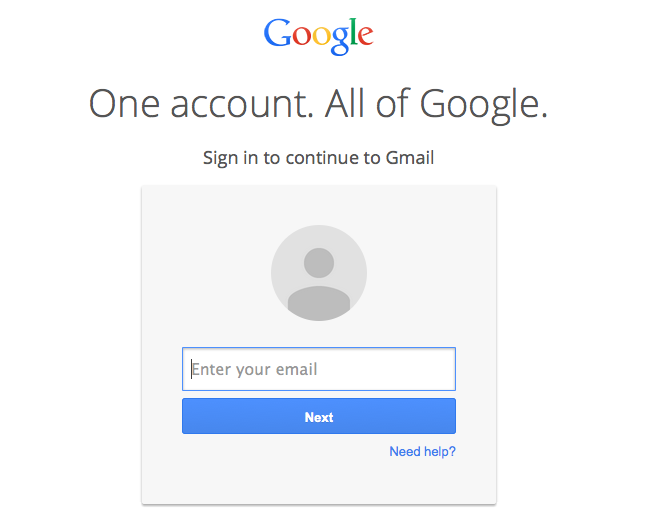
Log into your Gmail account with your gmail address and password.
Step #2
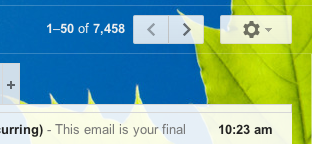
Click the “Settings” button in the upper right corner of the email browser.
Step #3
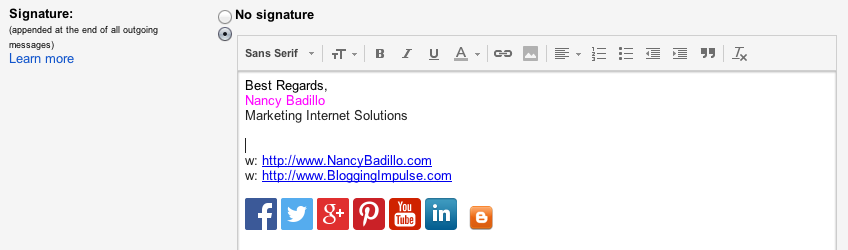
Click the “General” tab and scroll down the “Signature” box that enables you to enter a custom signature.
Step #4
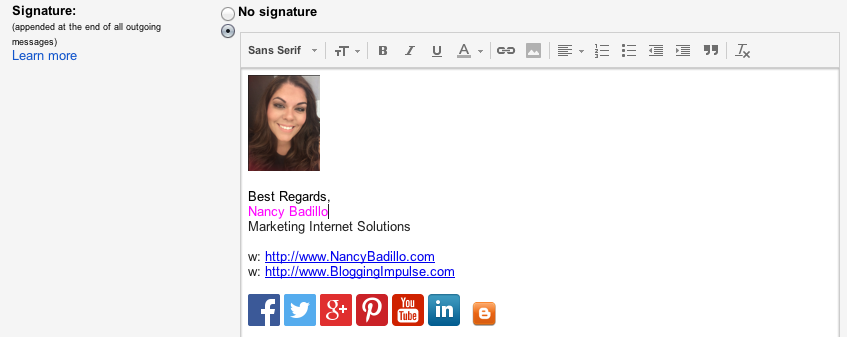
Click the “Insert Image” and “Upload” your image/logo. Select from the size options and drag the image above your signature. Make sure to save your changes.
This completes the tutorial how to add an image to your Gmail Signature. I hope this tutorial guide has come in handy. Make sure to subscribe to my blog to receive free online marketing tips.
source http://nancybadillo.com/how-to-add-an-image-to-your-gmail-signature/
source http://nancybadillo.com/how-to-add-an-image-to-your-gmail-signature/
Friday, 25 September 2015
Use These 10 Tips to Write Your Most Popular Post Ever

One popular post can bring your more traffic and links than a month’s worth of your usual content.
In this post, I want to set you a challenge with the potential to launch your blog into the stratosphere.
Make the next post you write your most popular post ever.
The following ten tips form my key advice for tackling this task. I used all of them when hitting the Digg front page for the first time. There’s no blueprint you can follow to write an incredibly popular post, but you won’t have a chance unless you try. I’m confident these tips will give you a good shot at success.
1. Time is more important than talent. Work on something for eight hours and you can bet it will be good. You don’t need to spend that long, however (though that’s how long it took me to craft the first post I wrote that hit the Digg front page). More time means you can refine, format and fill your post with plenty of value. Take the time to really craft your content. It will show in the finished product.
2. Use your best idea. A post will never become wildly popular unless it fulfills a need, and does so emphatically. What’s something your niche wants but hasn’t got yet? Can you assemble a whole lot of really awesome (targeted) resources in one place? The more your posts helps people, the better it will do.
3. Use formatting to your advantage. These days, social media is key when it comes to launching your posts into the stratosphere. Social media users are notoriously spoiled for choice, however. Use formatting to emphasize the best aspects of your post. Hone in on your funniest lines, your most profound bits of advice, your best resources. Make them stand out.

4. Brainstorm headlines. There are probably one or two bloggers who’ve completely mastered the art of writing headlines for social media (you’ll know who they are). The rest of us haven’t been blessed with such skills. When you see a great headline, chances are it’s option #12 of a dozen choices. Few of us can think of a great headline straight away. Spend ten minutes brainstorming and you’re bound to stumble across something that works. A weak headline will cripple your post’s chances of success. It’s essential that you put a lot of work into getting it right.
5. Invest plenty of value in your post. Ever bookmarked or voted for something without completely reading it? We’ve all done it. It’s because of the ‘Wow’ factor — the presence of enough promised value in one place gets the reader enthusiastic about the post straight away. Instead of 5 tips, why not share 50? Instead of 9 resources, why not 40 or more?
7. Beauty is in the eye of the beholder. If your post looks good, it will draw readers in. Take the time to add images, thumbnails and formatting to what you create. Make your post a visual feast. With so much web content presented in a bland way, your post is guaranteed to stand out.
8. Tell them what you’re going to tell them. Readers will skip your waffly introduction. You can say the same in less words, particularly when you’re writing for an impatient reader: someone who wants to get straight into your tips/resources/opinions. Use your introduction to highlight why the reader should stick with your post. There’s a reason my post introductions mainly consist of: “In this post, I’m going to do this, this and that.” It’s what people really want to know: what am I getting in exchange for my attention?
9. Send messages with links. The best way to get a blogger to investigate your blog is by linking to them. We’ve got a natural desire to know what’s being said about us. If your post becomes really popular, each link inside it should send enough traffic outwards to be worth investigating. Be generous with your outbound links when writing your most popular post. It gives other bloggers an incentive to link to you, because it’s ultimately more promotion for them.
10. Utilize your network. If you want people to Digg, Stumble or Reddit your post, there’s no reason why you need to sit back with fingers crossed and hope it happens. Ask them. Your loyal readers like you. You entertain them, or teach them, or help them. If voting is a simple matter of clicking a link they’ll be more than happy to do so. Ask for votes in your post and email readers and social media influencers. In most cases you will need to get the snowball rolling. After that, others will do most of the work for you.
Bonus tip:
11. Examine what worked before. Study your most popular posts so far. What’s common about them? Why did they work? What needs did they address? In creating your most popular post, it’s important to learn by example and build on what has worked for your blog in the past. Another good idea is to analyze the most popular posts on other blogs in your niche. Why did they work? What’s remarkable about them? You can transfer those qualities over into what you write.
Subscribe to:
Posts (Atom)